A Non-Developer's Workflow Automation Case That Began with a Staffing Rejection
This case examines a business operations manager who, despite insufficient staffing and standards, also took on maintenance work, removed bottlenecks, and began small-scale automation with Claude Code. The key was to first change the workflow structure that created unnecessary handoffs and repetition, rather than focusing on technology for completing tasks faster.
- The greater problem was not the increase in workload, but that the existing staff had to create new procedures and deliverable standards at the same time.
- Even brief file import and export requests can create a workload beyond their actual processing time when they repeatedly disrupt concentration.
- The first improvement to produce results was not an automation program, but rerouting requests so they no longer had to pass through the person in charge.
- Non-developers can also use generative AI and coding tools to create small automations through a cycle of describing the problem, running the solution, checking errors, and making corrections.
- Automation candidates should be evaluated not only by repetition frequency, but also by error risk, interruption frequency, standardization potential, and security controls.
People overwhelmed by repetitive tasks often begin by looking for ways to process them faster. But this case began differently. In a situation where adding staff was difficult, a project management specialist reconsidered why every request and review had to pass through them, rather than simply accelerating the work already concentrated in their hands.
This article does not introduce the features of automation technology. Instead, it analyzes the work environment that made automation unavoidable, the first structural improvements, the learning process of a non-developer, and the principles that can be generalized from that experience.
The Starting Point of the Case: Complexity Increased More Than Work Volume
The team had originally been responsible for an infrastructure operations project. It already had familiar workflows for keeping systems stable, responding to incidents, and compiling monthly performance results. The problem began when a new maintenance project was added without changing the existing staffing level.
This was different from performing the same work twice. While handling unfamiliar tasks, the specialist also had to design the following elements from scratch.
- Which deliverables to receive
- Which items to include in the documents
- How to determine the review sequence for vendors and customers
- How to manage numbers and schedules for each task
- How to collect and report signed deliverables
| Category | Existing Infrastructure Operations | Additional Maintenance Work |
|---|---|---|
| Work system | Familiar operating procedures already existed | Procedures and standards had to be designed from scratch |
| Main deliverables | Operational performance and incident response records | Schedules, work logs, signed copies, inspection materials, etc. |
| Parties managed | Primarily internal operations | Vendors, workers, responsible teams, and customers all participated |
| Main burden | Stable operations | Included establishing standards, coordinating schedules, reviewing, rejecting, and collecting |
The core cause of the overload was not merely that the amount of work had increased, but that the system for processing it also had to be created.
Without Standards, Reviews and Rejections Are Repeated
Because the existing standards for maintenance deliverables were insufficient, the specialist created forms and distributed them directly to vendors. At work sites, however, recurring problems included the use of forms from the previous year, missing worker signatures, and ambiguously written notes.
For example, if a result field says only “action to be taken later,” the manager cannot track when it will be completed. The document must be rejected with a request to provide a specific expected date, and the revised version must then be reviewed again. This creates a structure in which the administrative work of checking and correcting deliverables becomes greater than the inspection itself.
This case shows that standardization must come before document automation. If input formats and required fields have not been defined, an automation tool will merely transfer ambiguous and incomplete data more quickly. Before considering automation, the following should be determined.
- Fields that must be completed
- Permitted formats for dates and names
- Conditions requiring signatures or attachments
- Reasons for rejection and the person responsible for corrections
- Criteria for determining completion
Why Requests That Took Only a Few Minutes Disrupted the Entire Day
For security reasons, bringing external files in and taking them out was handled through a single point of contact: one designated specialist. Each request did not take long to process, but the problem was that requests arrived without warning.
When a request came in while the specialist was focused on their primary work, they had to stop and process the file. They then had to recall the context of the interrupted task. In this case, repeated task switching increased the perceived burden more than the time required for each individual request.
When identifying candidates for automation, it is not enough to calculate only the time needed to process one request. The following costs must also be considered.
- Time spent checking requests and determining priorities
- The switching cost of stopping and restarting existing work
- Time spent asking the requester again for missing information
- Time spent separately recording and reporting whether a request was processed
- Waiting time when a specific specialist is absent
Short but unpredictable recurring requests can become bottlenecks that significantly disrupt overall schedules and concentration.
The First Solution Was Not Automation but Removing a Route
The first improvement to the file transfer issue was not software development. The workflow was changed so that requesters and customers could exchange requests directly through a bulletin board in the internal project management system.
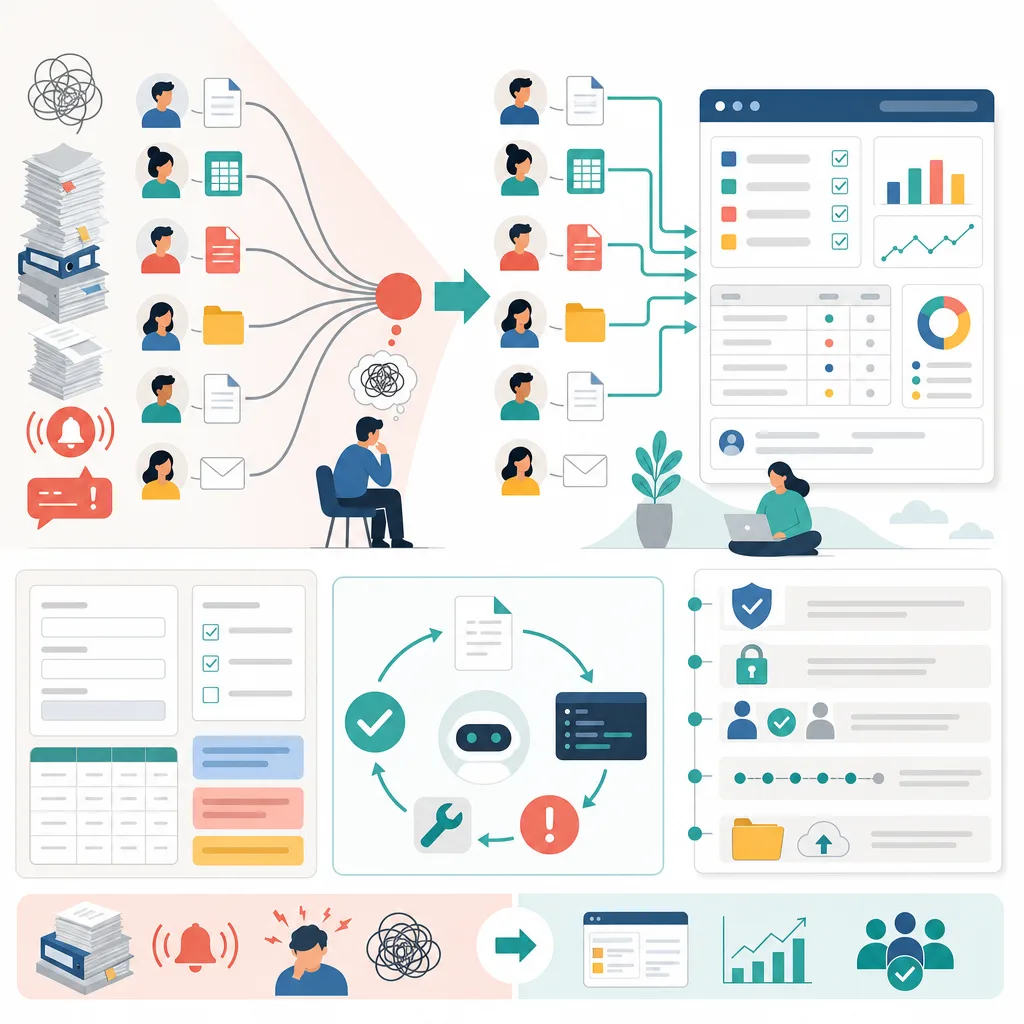
| Before the Change | After the Change |
|---|---|
| Every request passed through the project management specialist | Requesters and customers handled requests directly in the system |
| The specialist handled both delivery and recordkeeping | Processing records remained in the system |
| Primary work was interrupted whenever a request arrived | The specialist reviewed records when necessary |
| Requests could be delayed when the specialist was absent | Designated participants could review requests within the same workflow |
The principle that can be drawn from this is clear. Rather than performing an assigned task faster, a better solution may be to ensure that the task no longer needs to pass through you.
Before designing automation, it is useful to review the process in the following order.
- Is this a step that can be eliminated?
- Can the requester enter or verify the information directly?
- Can the route be simplified using features of the existing system?
- Can the input and decision criteria be standardized?
- Can the repetitive work that remains afterward be automated?
Overload Became Entrenched as Multiple Simple Tasks Arrived at Once
The overall maintenance workflow included establishing schedules, organizing vendor and worker information, assigning numbers, collecting work logs, obtaining customer reviews and signatures, scanning, reporting inspection results, and delivering outputs to each vendor. None of these stages was individually difficult, but when they overlapped, it became difficult for one person to control them through memory and manual work alone.
This situation continued for about three months. During the day, the specialist handled file transfer requests, vendor inquiries, confirmations from team members, and customer requests. Only after business hours, when incoming communications decreased, could they address the backlog of core tasks. Rather than solving the problem, they were continually catching up on events that had occurred that day.
The specialist requested additional support staff, but the request was denied. Once adding personnel was no longer possible, changing the existing approach became important. Automation was not a hobby that began out of personal interest. It was a response to the conclusion that the same problems would recur the following month under the current work structure.
A Claude Code Demonstration Prompted a Small Experiment
The turning point was a demonstration of automation using Claude at a headquarters event. More important than the complex development technology was recognizing the possibility that “we could apply this tool to our work as well.” A conversation with a colleague who attended the event about trying something small became the starting point for the subsequent automation work.
The specialist, who was not a developer, began by asking another generative AI how to install Claude Code. They reviewed and ran instructions and commands appropriate for the operating system and followed other users’ initial setup processes through video materials and other resources. They did not begin only after fully learning programming theory.
However, this approach does not mean that commands from unknown sources should be run without review. On work devices, organizational security policies and software installation permissions must be checked, and installation procedures from official documentation should be used whenever possible. Before running a command, users must also verify whether it deletes files, changes permissions, or transmits data externally.
The Interactive Problem-Solving Process Was More Important Than the Output
The first output gave the specialist confidence that “even a non-developer can build automation.” In this case, however, the more important learning came from the creation process rather than the finished program.
Interactive development generally proceeds through the following cycle.
- Explain the problem to be solved and the current procedure.
- Provide constraints such as input files, output formats, and security restrictions.
- Review the method and code proposed by the AI.
- Run them using copies or test data.
- Explain the error messages and results that differ from expectations.
- Apply the revisions and verify them again.
Generative AI can suggest technologies or approaches that users did not know about, and users can ask it to explain unfamiliar terms again. On the other hand, its suggestions are not always accurate or suitable for the organization’s environment. AI should therefore be treated not as an approving authority that makes judgments on the user’s behalf, but as an assistive tool that expands the available options and reduces trial and error.
Criteria for Selecting Automation Targets Derived from the Case
Not every task needs to be automated simply because it is repetitive. Evaluating the following criteria together makes it easier to set priorities.
| Evaluation Criterion | Question to Ask | Meaning |
|---|---|---|
| Frequency of repetition | How often does the same task occur? | The more frequently it recurs, the greater the potential cumulative savings |
| Processing rules | Can the inputs and results be described with clear rules? | The clearer the rules, the easier the implementation and verification |
| Frequency of interruption | Does it arrive without warning and interrupt core work? | Even short tasks can become high priorities |
| Impact of errors | Could omissions or misjudgments affect contracts, security, or costs? | Human approval may be necessary rather than full automation |
| Input quality | Are forms and required fields standardized? | Irregular inputs increase exception handling |
| Traceability | Can records show who processed what and when? | Necessary for audits and accountability |
| Potential for change | Do procedures and forms change frequently? | Maintenance costs must also be considered |
The first tasks to automate are generally small tasks with clear rules, high repetition frequency, and results that people can easily compare and verify. In contrast, it is safer to retain human review stages for work involving legal judgments, security approvals, contractual responsibility, or decisions about significant amounts of money.
Controls and Maintenance That Are Easy to Overlook in Automation
If automation is rushed because the work is urgent, the risks of existing manual processes may simply be transferred into code. Particularly in an environment like this case, where external files, signed documents, and customer data are handled, controls must be designed alongside processing speed.
Minimum Controls to Review
- Permissions: Limit the folders and accounts that the automation tool can access to the necessary scope.
- Data protection: Do not enter personal information, contract materials, or authentication information into unauthorized external AI services.
- Test environment: Run the automation first using copies rather than originals and using de-identified test data.
- Human approval: Add confirmation procedures for difficult-to-reverse steps such as file transfers, deletion, and final reporting.
- Records: Retain records of inputs, execution times, processing results, errors, and revision history.
- Recovery: Preserve originals and backups so that the previous state can be restored after a failure.
- Dependency on the person responsible: Document how to run and stop the automation so that team members other than its creator can use it.
The success criterion for automation should not be that “it ran once.” It should also be evaluated based on whether it can be modified when forms change or the person responsible is replaced, whether errors can be detected, and whether the process can return to a manual procedure. These criteria distinguish a short-term personal productivity tool from a sustainable work system.
Facts Confirmed by the Experience and Limitations of Generalization
Because this case is based on the actual experience of one specialist, it does not guarantee the same results for every organization. It is necessary to distinguish between what was directly confirmed in the case and what must be verified when applying it in another environment.
| What Was Observed in the Case | What Must Be Confirmed Separately Before Application |
|---|---|
| New maintenance work was added without staffing changes | Staffing arrangements and the possibility of adjusting responsibilities in each organization |
| A single point of contact caused repeated interruptions to the specialist’s work | Whether direct processing between requesters is permitted under security regulations |
| An existing management system’s bulletin board reduced intermediary steps | The permissions, record-retention, and approval features of the system in use |
| A non-developer installed and learned to use the tool with guidance from generative AI | Software installation permissions on company devices and policies governing the use of external AI |
| A small output led to confidence in attempting additional automation | Automation accuracy, time saved, and maintenance costs |
The core value of this case, therefore, does not lie in claiming that a particular tool produces the same results for everyone. It lies in redefining repetitive work not as a lack of individual effort, but as a problem involving workflows, standards, permissions, and bottlenecks.
Conclusion: A Lack of Time Can Be the Starting Point
Automation does not have to be treated only as a separate project to learn after spare time becomes available. If work continues to accumulate and the same problems will recur the following month, that may be a signal that the current structure needs to change.
The starting point does not need to be an ambitious development plan. You can choose the one request that most frequently breaks your concentration and first determine whether that step truly has to pass through you. If it cannot be eliminated or transferred to an existing system, it is safer to standardize the input format and begin by automating a small part whose results can be easily verified.
The most important question left by this case is not, “How can I do this work faster?” It is, “Why does this work keep recurring, why must it pass through me, and how much of the process can be entrusted to a system?”
FAQ
Can non-developers also get started with workflow automation?
Yes, but it is safer to start with a limited scope. You should clearly describe the current process and the input and output conditions, run the method suggested by generative AI using copies or test data, and then verify the results yourself.
Should all repetitive tasks be automated?
No. First, you should check whether the step can be eliminated or handled directly by the requester. If elimination and process simplification are difficult and the repetitive task has clear rules, automation can be considered.
Is it worth automating tasks that take little time to complete?
It may be worthwhile if they occur frequently without warning and interrupt core work. You should assess not only the time required to handle each case, but also the costs of checking requests, switching tasks, filling in missing information, keeping records, and refocusing.
Why is standardization necessary before workflow automation?
Because if required fields and input formats are inconsistent, it is difficult for automation to handle exceptions reliably. Defining completion criteria, date formats, signature requirements, and reasons for rejection first makes implementation and verification easier.
Can I run code generated by generative AI as is?
You should not run it as is. You must review whether it deletes files, changes permissions, or sends data externally, and check your organization's security policies and installation permissions. It is safer to verify it first using copies rather than original files and de-identified test data.
Can automation eliminate all human review?
It depends on the level of risk involved in the work. Human review and approval procedures should remain in steps where errors could have a major impact, such as file transfers and deletion, security approvals, contractual judgments, and decisions involving significant amounts of money.
What type of task should be selected for the first automation project?
Small tasks that are performed frequently, follow clear rules, and produce results that people can easily cross-check are suitable. You should also check whether the original can be used to recover from errors and whether the risk of exposing sensitive information is low.
How do you determine whether automation has been successful?
Do not look only at whether it runs successfully; also compare the number of interruptions, rejections and omissions, processing delays, and time spent correcting errors. You should also assess whether it can be maintained when forms change or the person in charge is replaced, and whether you can revert to a manual process if it fails.
Sources
Images