On-Site Marketing Design: Personalized Scenarios That Turn Ad-Driven Visitors into Buyers
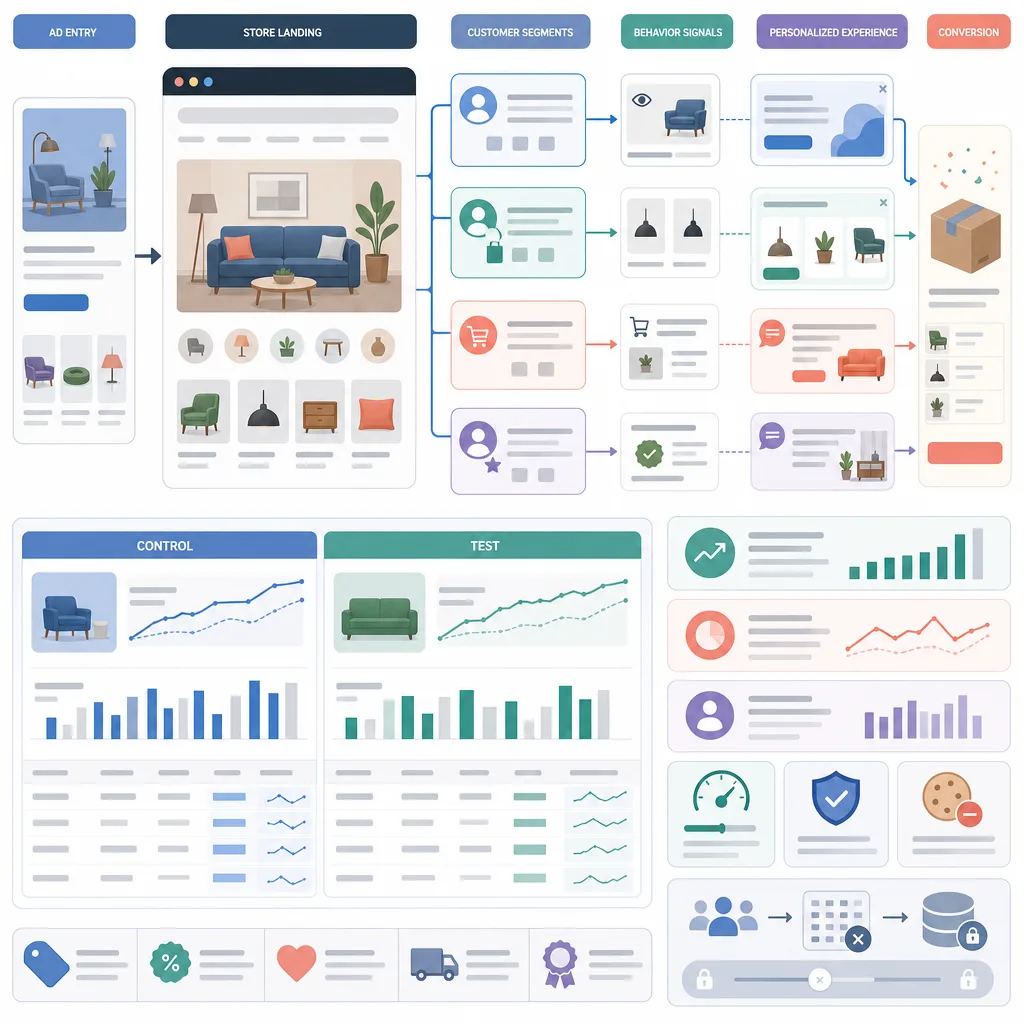
On-site marketing is not about showing the same pop-up to every visitor. It is a conversion strategy that helps customers take the next step based on their status, behavior, and acquisition context. This guide covers the practical design process and common scenarios, from customer segmentation and display conditions to messaging, performance measurement, and privacy protection.
- Segment customers using data you can actually collect, such as membership status, purchase history, and ad acquisition information.
- Define behaviors that indicate purchase intent, such as browsing pages, adding items to the cart, and reaching checkout, along with when to intervene.
- Connect each customer segment with one message that reduces hesitation and one delivery method, such as a banner, pop-up, or chat.
- Use experiments that include a control group to assess not only purchase conversion rates but also subsequent metrics such as profit, returns, and subscription cancellations.
- Scale only validated scenarios while controlling duplicate exposure, excessive discounts, and tracking without consent.
An ad click does not mean a purchase has been completed. It means a new persuasion process has begun within your online store. On-site marketing helps visitors take the next action by providing appropriate guidance based on their acquisition context, membership status, purchase history, and current behavior.
The key is not to display more pop-ups. You need to specify who should see what and when, then verify through experiments whether it actually contributes to conversions.
Step 1: Define the Data and Customer Segments to Use
First, identify the data that your online store can currently collect reliably. Relying on nonexistent or low-quality data creates scenarios that appear sophisticated but do not work.
Practical Criteria for Segmenting Customers
| Segmentation axis | Specific status | Possible objective |
|---|---|---|
| Membership status | Non-member, new member, existing member, long-inactive member | Registration, first purchase, reactivation |
| Purchase history | No purchases, first purchase, repeat purchases, purchase of a specific product | First conversion, repurchase, cross-selling |
| Customer value | Number of orders, cumulative revenue, most recent purchase date | High-value customer management, churn prevention |
| Acquisition context | Ad campaign, creative, search term, partner content | Connect ad messaging with the landing experience |
| Current behavior | Products viewed, browsing depth, cart, checkout stage | Support comparison, prevent abandonment, assist checkout |
| Device and environment | Mobile or desktop, app or web | Optimize the screen and interaction method |
Rather than automatically classifying customers as VIPs simply because they have high customer value, document criteria that fit your business. For example, you can combine recency, purchase frequency, and purchase amount, but you must separately determine whether to exclude returns and cancellations and which period to use for the calculation.
Minimum Events Needed When Starting Out
- Product listing or product detail page view
- Cart addition and removal
- Checkout started
- Purchase completed and order amount
- Login or registration completed
- Ad acquisition information, such as campaign and creative
Document event names, trigger conditions, and the formats of product IDs and amounts in a data specification. Performance evaluation may be distorted if purchase events are sent more than once when the page is refreshed or if ad information disappears after the visitor moves to another page.
Step 2: Set Purchase Intent and Intervention Timing
You cannot determine a visitor’s intent solely from what they did. Viewing multiple pages may indicate strong interest, or it may mean that the visitor could not find the product they wanted. Therefore, treat behavioral signals as hypotheses and validate them through experiments.
Behavioral Signals You Can Use
- Repeatedly viewing the same product or category
- Exploring product descriptions or review sections in depth
- Selecting an option without adding the product to the cart
- Browsing other pages after adding an item to the cart
- Accessing the checkout page without completing a purchase
- Revisiting a previously purchased product around the expected time of repurchase
Numbers such as “5 page views” or “50% scroll depth” are only starting points, not universal answers. It is difficult to apply the same criteria to a store with few products and one where comparison shopping takes a long time. Adjust the criteria based on the distribution of actual visitor sessions and conversion data.
Intervention Priorities
- First, fix structural issues that prevent purchases, such as checkout errors, out-of-stock options, and uncertainty about shipping fees.
- Next, provide information needed to make a decision, such as size, compatibility, and the estimated delivery date.
- Offer consultation or benefits when information alone cannot resolve the hesitation.
- Use price discounts as a last resort.
If you display discounts first, you also incur costs for customers who would have purchased at the regular price. There is also a risk of teaching visitors that they will receive a coupon if they return repeatedly.
Step 3: Connect Messages with Display Formats
Connect each customer segment with one objective and one core message. If a single screen simultaneously asks visitors to register, install an app, use a discount, and request a consultation, it becomes unclear what they should do.
6 Common Scenarios
| Audience and situation | Hesitation to address | Example offer | Suitable format | Key metrics |
|---|---|---|---|---|
| First-time non-member visitor | Does not yet know the brand or benefits | Explain member benefits and post-registration terms of use | Floating banner, inline section | Registration completion rate, first-purchase rate |
| Visitor from a specific ad | Weak connection between the ad and landing page | Continue presenting the product, benefit, or content shown in the ad | Landing banner, related video | Bounce rate, product view rate, purchase rate |
| Visitor comparing multiple products | Lacks selection criteria | Comparison table, recommendation criteria, consultation information | Inline card, tooltip | Cart addition rate, post-consultation purchase rate |
| Visitor with items in the cart | Has forgotten the saved items or is checking conditions | Provide a path back to the cart and information about shipping and inventory | Floating button, mini cart | Checkout start rate, purchase completion rate |
| Customer below the free-shipping threshold | Weighing the shipping fee against an additional purchase | Show the remaining amount needed and related low-priced products | Cart progress bar | Average order value, purchase rate, profit margin |
| Existing customer at the expected time of repurchase | Missed the replacement time for a consumable product | Provide the previously purchased product and a simple repurchase path | Personalized banner, post-login recommendation | Repurchase rate, repurchase interval |
How to Connect Ad and Landing Messages
Make sure that the product, problem-solving benefit, or promotional terms highlighted in the ad are also visible on the first screen of the landing page. If the ad features a specific product but directs visitors to a generic home page, or if the landing page shows terms different from the ad, visitors may conclude that they have arrived at the wrong place.
However, mechanically copying the wording is not enough. The landing page should also provide the following information:
- Conditions that apply to what the ad promised
- Specific explanations supporting the product’s features
- Information needed for a purchase decision, such as price, shipping, exchanges, and refunds
- Reviews or ratings whose actual sources and context can be verified
- A clear button leading to the desired action
Support Decisions Rather Than Offering Discounts for High-Consideration Products
For expensive products or those requiring installation or consultation, the following methods may be more useful than an immediate discount:
- Product comparison tables and selection guides
- Confirmation of specifications, compatibility, and installation requirements
- Shipping or appointment schedule information
- Consultation booking or chat connection
- Clear display of warranty, exchange, and refund terms
Social proof and urgency messages, such as real-time purchase counts or low-stock notices, must be based on actual data. Displaying nonexistent purchasing activity or artificial deadlines can undermine trust and violate consumer protection regulations in the applicable jurisdiction.
Step 4: Control Group Experiments and Performance Measurement
You should not conclude that an on-site message was effective simply because sales increased after the campaign was displayed. Ad spend volume, day of the week, price, inventory, and seasonality may all have an impact at the same time.
Basic Experiment Structure
- Control group: Keep the existing screen unchanged.
- Experiment group: Display the personalized message or feature.
- Maintain group assignments so visitors do not move between groups during the experiment.
- Changing one core variable in each experiment makes the results easier to interpret.
- Define the primary metric, secondary metrics, and stopping conditions before starting.
If traffic is low, do not draw conclusions based only on short-term fluctuations in purchase rates. The required sample size and experiment duration depend on the existing conversion rate, the effect size you want to detect, and traffic volume. It is safer to calculate the conditions using a statistical tool or with the help of an analytics specialist.
Metrics You Miss by Looking Only at Conversion Rate
| Metric area | Items to check | Why it is needed |
|---|---|---|
| Direct conversion | Cart addition rate, checkout start rate, purchase rate | Confirm whether the target action increased |
| Economics | Average order value, discount costs, gross profit | Confirm whether increased revenue leads to actual profit |
| Customer quality | Repurchase rate, purchase interval, revenue per customer | Confirm whether customers attracted by short-term benefits develop into long-term relationships |
| Side effects | Pop-up closures, abandonment, unsubscribes, returns | Check for increases in disruption and low-quality orders |
| Operational quality | Loading speed, error rate, duplicate displays | Confirm whether the campaign harms the site experience |
Whenever possible, evaluate performance based on incremental impact. For example, examine the difference between the experiment group’s conversion rate and the control group’s conversion rate, while also accounting for discounts provided and solution costs. If every purchase made after exposure is counted as campaign performance, the result will include customers who would have purchased anyway.
Step 5: Expand and Operate Validated Scenarios
Do not create dozens of rules from the start. Begin with 1–2 scenarios supported by stable data. Suitable examples include a campaign connecting ad messages with landing pages or cart return guidance, where the audience and objective are clear.
Step-by-Step Expansion Method
- Select one customer segment and one objective.
- Keep the existing experience as the control group.
- Set exposure frequency and exclusion conditions.
- Review both experiment results and side effects.
- Retain only rules with confirmed effectiveness.
- Expand in the order of repurchase, cross-selling, and reactivation of inactive customers.
In site-building environments such as Cafe24, imweb, and GODOmall, you can check whether compatible CRM or on-site tools are available. When choosing a tool, prioritize the following features over the number of available pop-up designs:
- Scope of event and order data integration
- Customer segment and exclusion condition settings
- Support for control groups and randomized experiments
- Exposure frequency limits
- Impact on mobile screens and site speed
- Application of personal data deletion and consent withdrawal
- Export of raw performance data
Designing On-Site Marketing Without Discounts
If you treat on-site marketing as equivalent to coupon management, margins may decline and only price-sensitive customers may remain. Reducing the information costs and anxiety that prevent purchases is also an important form of personalization.
The following methods can be tested without discounts:
- Shorten product discovery paths based on the visitor’s purpose
- Restore previously viewed products and comparison lists
- Provide selection guides based on size, use case, and budget
- Communicate estimated delivery dates and return terms early
- Suggest consumables and accessories compatible with purchased products
- Connect visitors to FAQs or consultations suited to their circumstances
- Notify visitors about the options and inventory status of products in their cart
These methods directly address the reasons customers delay decisions, so they are worth testing even without reducing prices.
Protecting Personal Data and Preventing Excessive Persuasion
Personalization does not necessarily improve as more data is collected. Use only the minimum data necessary for the purpose and check the applicable privacy, cookie, and e-commerce regulations. Consent requirements may vary depending on the visitor’s location, the type of data, the technology used, and the business operator’s legal status.
Items to Check Before Launch
- Are the purposes of cookies and tracking technologies disclosed in an easy-to-understand way?
- Do technologies that legally require consent operate only after consent is obtained?
- Is consent withdrawal reflected in the personalization system as well?
- Does the system avoid unnecessarily inferring sensitive attributes such as health, finances, or political orientation?
- Does it avoid deceptive practices such as fake deadlines, fake inventory, or hidden costs?
- Is there a priority system to prevent campaigns from overlapping for the same visitor?
- Are the criteria for customer identification and data combination before and after login documented?
- Is behavioral data deleted after its retention period expires?
The purpose of personalization should not be to pressure customers, but to reduce the information needed for their current decision and present a suitable next action.
Practical Scenario Specification
Do not configure an idea directly in a tool. First, document the following items on a single page.
| Item | Details to document |
|---|---|
| Objective | One of registration, cart return, purchase, or repurchase |
| Audience | Data conditions for customers to include |
| Exclusions | Customers who have already purchased, users of the relevant benefit, etc. |
| Behavioral conditions | Views, cart activity, checkout access, etc. |
| Exposure timing | Immediately after conditions are met, on the next page, etc. |
| Message | The hesitation to address and the proposed solution |
| Format | Banner, inline card, tooltip, consultation, etc. |
| Frequency | Maximum number of exposures per session, day, or week |
| Control group | Comparison group that does not see the message |
| Primary metric | A single core metric that determines whether the experiment succeeds |
| Guardrail metrics | Abandonment, returns, profit, site speed, etc. |
| Stopping conditions | Conditions related to duration, sample size, inventory, or promotion end |
Using this specification enables marketing, design, development, and data teams to understand the same conditions and makes it easier to manage conflicts as the number of campaigns increases.
Key Takeaways
On-site marketing is not about unconditionally providing benefits to visitors acquired through external advertising. It is the design of a purchase journey that estimates the causes of hesitation based on customer status and behavior, then presents the necessary information or next action at the appropriate moment.
To improve performance, manage customer segmentation, behavioral conditions, messages, control groups, and profit metrics as a single scenario. It is safer to start with small experiments and expand only experiences with confirmed incremental impact than to introduce complex personalization rules all at once.
FAQ
How is onsite marketing different from running standard pop-ups?
Standard pop-ups often show the same content to every visitor. Onsite marketing segments audiences and timing based on conditions such as membership status, referring ads, purchase history, and shopping cart contents, and measures the incremental impact of each campaign.
What scenarios are suitable when first starting onsite marketing?
Start with scenarios that have clear data and a single objective. One or two items for which the audience, conditions, and actions can be easily defined are suitable, such as aligning ad creatives with landing page messages, prompting non-members to sign up, or encouraging visitors to return to their carts.
After how many page views should a visitor be shown a pop-up?
There is no fixed standard that applies to every online store. Analyze the distributions of page views, time on site, and scroll depth, along with purchase rates, to establish an initial threshold, and then verify its effectiveness through a control-group experiment.
Should customers who abandon their carts be offered a discount coupon immediately?
Not necessarily. First investigate the reasons for abandonment, such as shipping costs, estimated arrival dates, options, payment errors, or return policies. You can reduce unnecessary costs by first testing clearer information or a shorter path back to the cart without offering a discount.
Which metrics should be used to measure the performance of an onsite campaign?
Depending on the campaign's objective, use the sign-up rate, add-to-cart rate, checkout initiation rate, or purchase rate as the primary metric. You should also monitor average order value, discount costs, gross profit, return rate, repeat purchase rate, pop-up close rate, and bounce rate.
Can every purchase made after campaign exposure be counted as a result?
No. This may include customers who would have made a purchase even without the message. Maintain a randomized control group and compare conversion differences between the test and control groups to estimate the incremental impact generated by the campaign.
Can visitors who are not members also receive personalized experiences?
You can use permitted contextual data, such as products viewed during the session, the acquisition campaign, and shopping cart status. However, if cookies or identifiers are used, you must check the consent and disclosure requirements in the applicable region and process only the minimum data necessary.
What should I do if multiple onsite campaigns are displayed at the same time?
Set priorities based on the purchase stage and importance, and limit the maximum number of impressions on a single screen or during a single session. Exclude visitors who have already completed the target action, and also check that pop-ups, banners, and support messages do not present conflicting offers.
Can onsite marketing be done without discounts?
Yes. You can personalize the information and paths needed to make purchase decisions, such as product comparisons, size selection, compatibility checks, estimated delivery dates, return policies, restoring previously viewed items, and connecting with support.
How should the timing of repeat purchases be determined?
Rather than setting an arbitrary fixed interval, review the distribution of actual intervals between orders for each product. Because usage and purchase cycles vary by customer, exclude reminders that are too early, and if there is insufficient repeat purchase data, it is safer to test across a broad range.
Sources
Images