Injoys

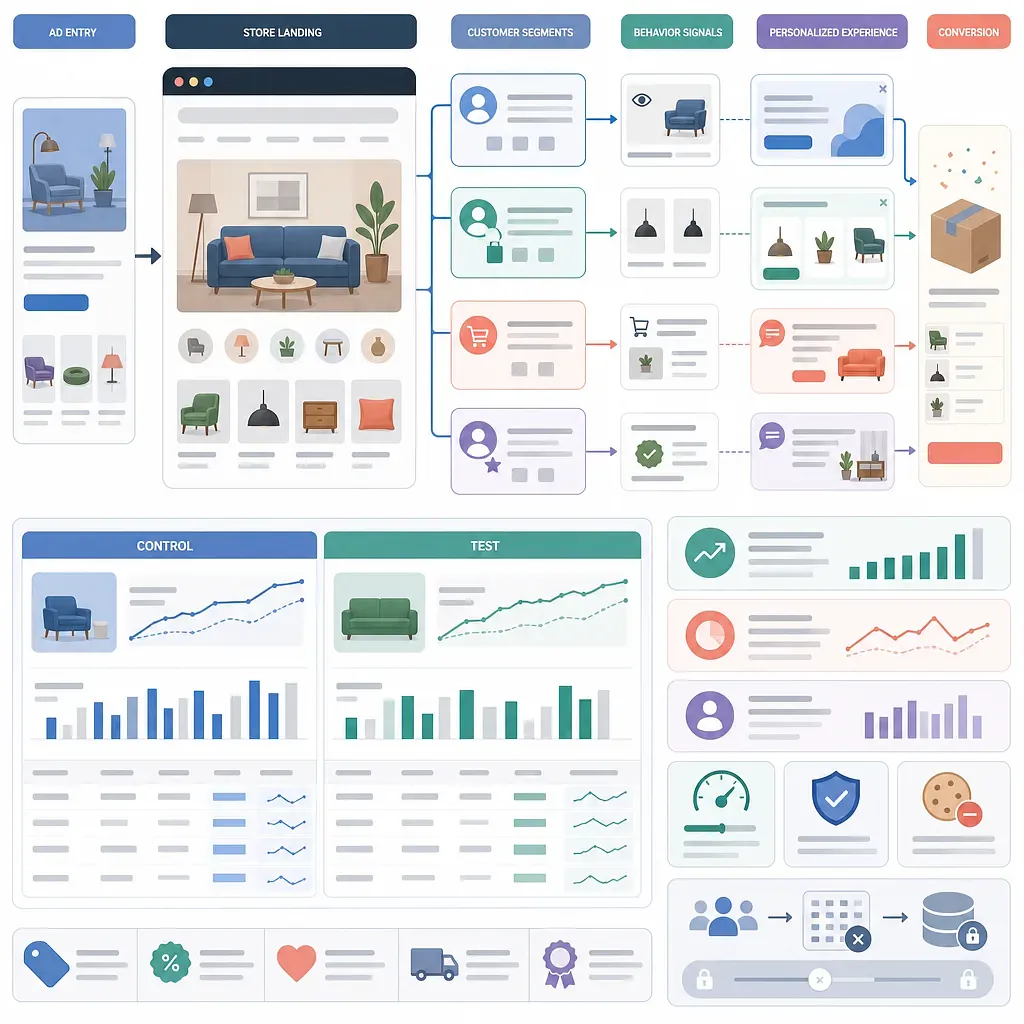
An ad click does not mean a purchase has been completed. It means a new persuasion process has begun within your online store. On-site marketing helps visitors take the next action by providing appropriate guidance based on their acquisition context, membership status, purchase history, and current behavior.
The key is not to display more pop-ups. You need to specify who should see what and when, then verify through experiments whether it actually contributes to conversions.
Step 1: Define the Data and Customer Segments to Use
First, identify the data that your online store can currently collect reliably. Relying on nonexistent or low-quality data creates scenarios that appear sophisticated but do not work.
Practical Criteria for Segmenting Customers
| Segmentation axis | Specific status | Possible objective |
|---|---|---|
| Membership status | Non-member, new member, existing member, long-inactive member | Registration, first purchase, reactivation |
| Purchase history | No purchases, first purchase, repeat purchases, purchase of a specific product | First conversion, repurchase, cross-selling |
| Customer value | Number of orders, cumulative revenue, most recent purchase date | High-value customer management, churn prevention |
| Acquisition context | Ad campaign, creative, search term, partner content | Connect ad messaging with the landing experience |
| Current behavior | Products viewed, browsing depth, cart, checkout stage | Support comparison, prevent abandonment, assist checkout |
| Device and environment | Mobile or desktop, app or web | Optimize the screen and interaction method |
Rather than automatically classifying customers as VIPs simply because they have high customer value, document criteria that fit your business. For example, you can combine recency, purchase frequency, and purchase amount, but you must separately determine whether to exclude returns and cancellations and which period to use for the calculation.
Minimum Events Needed When Starting Out
- Product listing or product detail page view
- Cart addition and removal
- Checkout started
- Purchase completed and order amount
- Login or registration completed
- Ad acquisition information, such as campaign and creative
Document event names, trigger conditions, and the formats of product IDs and amounts in a data specification. Performance evaluation may be distorted if purchase events are sent more than once when the page is refreshed or if ad information disappears after the visitor moves to another page.
Step 2: Set Purchase Intent and Intervention Timing
You cannot determine a visitor’s intent solely from what they did. Viewing multiple pages may indicate strong interest, or it may mean that the visitor could not find the product they wanted. Therefore, treat behavioral signals as hypotheses and validate them through experiments.
Behavioral Signals You Can Use
- Repeatedly viewing the same product or category
- Exploring product descriptions or review sections in depth
- Selecting an option without adding the product to the cart
- Browsing other pages after adding an item to the cart
- Accessing the checkout page without completing a purchase
- Revisiting a previously purchased product around the expected time of repurchase
Numbers such as “5 page views” or “50% scroll depth” are only starting points, not universal answers. It is difficult to apply the same criteria to a store with few products and one where comparison shopping takes a long time. Adjust the criteria based on the distribution of actual visitor sessions and conversion data.
Intervention Priorities
- First, fix structural issues that prevent purchases, such as checkout errors, out-of-stock options, and uncertainty about shipping fees.
- Next, provide information needed to make a decision, such as size, compatibility, and the estimated delivery date.
- Offer consultation or benefits when information alone cannot resolve the hesitation.
- Use price discounts as a last resort.
If you display discounts first, you also incur costs for customers who would have purchased at the regular price. There is also a risk of teaching visitors that they will receive a coupon if they return repeatedly.
Step 3: Connect Messages with Display Formats
Connect each customer segment with one objective and one core message. If a single screen simultaneously asks visitors to register, install an app, use a discount, and request a consultation, it becomes unclear what they should do.
6 Common Scenarios
| Audience and situation | Hesitation to address | Example offer | Suitable format | Key metrics |
|---|---|---|---|---|
| First-time non-member visitor | Does not yet know the brand or benefits | Explain member benefits and post-registration terms of use | Floating banner, inline section | Registration completion rate, first-purchase rate |
| Visitor from a specific ad | Weak connection between the ad and landing page | Continue presenting the product, benefit, or content shown in the ad | Landing banner, related video | Bounce rate, product view rate, purchase rate |
| Visitor comparing multiple products | Lacks selection criteria | Comparison table, recommendation criteria, consultation information | Inline card, tooltip | Cart addition rate, post-consultation purchase rate |
| Visitor with items in the cart | Has forgotten the saved items or is checking conditions | Provide a path back to the cart and information about shipping and inventory | Floating button, mini cart | Checkout start rate, purchase completion rate |
| Customer below the free-shipping threshold | Weighing the shipping fee against an additional purchase | Show the remaining amount needed and related low-priced products | Cart progress bar | Average order value, purchase rate, profit margin |
| Existing customer at the expected time of repurchase | Missed the replacement time for a consumable product | Provide the previously purchased product and a simple repurchase path | Personalized banner, post-login recommendation | Repurchase rate, repurchase interval |
How to Connect Ad and Landing Messages
Make sure that the product, problem-solving benefit, or promotional terms highlighted in the ad are also visible on the first screen of the landing page. If the ad features a specific product but directs visitors to a generic home page, or if the landing page shows terms different from the ad, visitors may conclude that they have arrived at the wrong place.
However, mechanically copying the wording is not enough. The landing page should also provide the following information:
- Conditions that apply to what the ad promised
- Specific explanations supporting the product’s features
- Information needed for a purchase decision, such as price, shipping, exchanges, and refunds
- Reviews or ratings whose actual sources and context can be verified
- A clear button leading to the desired action
Support Decisions Rather Than Offering Discounts for High-Consideration Products
For expensive products or those requiring installation or consultation, the following methods may be more useful than an immediate discount:
- Product comparison tables and selection guides
- Confirmation of specifications, compatibility, and installation requirements
- Shipping or appointment schedule information
- Consultation booking or chat connection
- Clear display of warranty, exchange, and refund terms
Social proof and urgency messages, such as real-time purchase counts or low-stock notices, must be based on actual data. Displaying nonexistent purchasing activity or artificial deadlines can undermine trust and violate consumer protection regulations in the applicable jurisdiction.
Step 4: Control Group Experiments and Performance Measurement
You should not conclude that an on-site message was effective simply because sales increased after the campaign was displayed. Ad spend volume, day of the week, price, inventory, and seasonality may all have an impact at the same time.
Basic Experiment Structure
- Control group: Keep the existing screen unchanged.
- Experiment group: Display the personalized message or feature.
- Maintain group assignments so visitors do not move between groups during the experiment.
- Changing one core variable in each experiment makes the results easier to interpret.
- Define the primary metric, secondary metrics, and stopping conditions before starting.
If traffic is low, do not draw conclusions based only on short-term fluctuations in purchase rates. The required sample size and experiment duration depend on the existing conversion rate, the effect size you want to detect, and traffic volume. It is safer to calculate the conditions using a statistical tool or with the help of an analytics specialist.
Metrics You Miss by Looking Only at Conversion Rate
| Metric area | Items to check | Why it is needed |
|---|---|---|
| Direct conversion | Cart addition rate, checkout start rate, purchase rate | Confirm whether the target action increased |
| Economics | Average order value, discount costs, gross profit | Confirm whether increased revenue leads to actual profit |
| Customer quality | Repurchase rate, purchase interval, revenue per customer | Confirm whether customers attracted by short-term benefits develop into long-term relationships |
| Side effects | Pop-up closures, abandonment, unsubscribes, returns | Check for increases in disruption and low-quality orders |
| Operational quality | Loading speed, error rate, duplicate displays | Confirm whether the campaign harms the site experience |
Whenever possible, evaluate performance based on incremental impact. For example, examine the difference between the experiment group’s conversion rate and the control group’s conversion rate, while also accounting for discounts provided and solution costs. If every purchase made after exposure is counted as campaign performance, the result will include customers who would have purchased anyway.