Skip to content
Injoys
Tutorial

Google Ads Setup and Management Guide for 5 Campaign Types

Learn the setup sequence and differences among Google Ads Search, Video, Performance Max, Demand Gen, and Display campaigns. It also addresses common errors involving location, language, budget, conversion tracking, and audience signals.

Listen or read this article

21:01

Listen, or read the text only.

Google Ads Setup and Management Guide for 5 Campaign Types

Kokoro 82M AI-generated voice 22 min read

0:00 21:01

Advertisement

Download audio

File name
google-ads-five-campaign-setup-guide-en.mp3
Format
MP3 (audio/mpeg)
Duration
21:01
File size
14.4 MB
Engine
Kokoro 82M

This audio was generated by AI.

You may download and use it freely for personal use.

Google Ads Setup and Management Guide for 5 Campaign Types

16 min read

Google Ads Setup and Management Guide for 5 Campaign Types
Learn the setup sequence and differences among Google Ads Search, Video, Performance Max, Demand Gen, and Display campaigns. It also addresses common errors involving location, language, budget, conversion tracking, and audience signals.
Before creating ads, first define key conversions such as purchases, inquiries, and sign-ups, as well as their conversion values, and check for duplicate counting.
Choose a campaign type after deciding whether its role is to capture existing customer demand, generate visual demand, or automate advertising across all channels.
Review location, language, network, device, budget, and bidding settings rather than using the defaults unchanged.
Configure keywords, audience signals, product feeds, and image, video, and text assets suited to the campaign type.
After publishing, review search term, placement, device, and conversion value data, and test only one major variable at a time.
Setting up Google Ads campaigns is less about entering values on a screen and more about designing which conversions to train the system on and which inventory to allocate the budget to. Search, Video, Performance Max, Demand Gen, and Display differ not only in where ads appear but also in the data they require and the metrics used to evaluate them.
This guide explains the practical workflow for the five campaign types, from shared preparation steps through post-launch optimization. Because Google Ads screens and menu names may vary depending on account type, objective, country, and feature rollout status, you should also review the final summary screen and official Help documentation immediately before publishing.
Step 1: Prepare conversion measurement before creating campaigns
Automated bidding optimizes based on conversions recorded in the account. If you designate the wrong conversion as a primary goal, the budget may be concentrated on unwanted actions even when the setup is otherwise sophisticated.
How to define key conversions
Business type | Primary conversion candidates | Secondary metric candidates | Values to verify E-commerce | Completed purchase | Add to cart, product view | Revenue, currency, order ID Consultation·lead collection | Qualified inquiry, completed booking | Phone click, form start | Duplicate inquiries, lead quality Subscription service | Paid signup, conversion after trial | Trial signup, pricing plan view | Customer value, churn rate Offline store | Booking, verified call, in-store sale | Directions, store page view | Whether offline conversions are connected
You can generally find the settings under Tools or Goals > Conversions. Check the following before publishing.
· Make sure purchases collected through the Google tag and purchases imported from GA4 are not both designated as primary conversions. · Pass the actual payment amount and currency with purchase conversions. · If you can pass an order ID, use it to reduce duplicate counting caused by refreshes or return visits. · If necessary, separate actions that are not final outcomes, such as page views and button clicks, into secondary conversions. · Collect and use personal information and advertising data in accordance with applicable laws, user consent, and Google’s Customer Match and personalized advertising policies.
Screen review point: Do not look only at the goal name displayed on the campaign creation screen. Expand the goal and check which conversion actions it includes.
Step 2: Choose the right campaign type for your objective
The five campaign types are not completely interchangeable. It is reasonable to choose based on whether customers are already searching, whether you need to create new demand, and whether you have a product feed and sufficient conversion data.
Campaign | Primary role | Main inventory | Best-suited situations | Caution Search | Capture existing expressed demand | Google search results, etc. | Acquiring customers who search for products or services using keywords | Search term management and separation of brand and generic keywords are important Video | Drive awareness, reach, and video views | YouTube and selected video partner inventory | Delivering video messages and expanding reach | For conversion-focused video campaigns, Demand Gen or Performance Max should also be compared Performance Max | Maximize conversions across multiple Google channels | Search, Shopping, YouTube, Display, Discover, Gmail, Maps, etc. | When conversion tracking and assets or a product feed are ready | Relies more heavily on automation than channel-level control Demand Gen | Create demand and re-engage users with visual creative | YouTube, Shorts, Discover, Gmail, and supported Display inventory | When discovering new prospects through images and video | Audience signals should not be mistaken for fixed targeting Display | Banner reach, remarketing, and contextual/placement targeting | GDN inventory across websites, apps, YouTube, etc. | When broad reach or specific placements are needed | Check apps, low-quality placements, and unintended expansion
The former conversion-focused Video Action Campaign functionality has shifted toward being integrated into and migrated to Demand Gen. If video campaign subtypes are not shown in the current interface or the available feature set differs, compare them with video ads in Demand Gen.
Creating a campaign without goal guidance is not always the right answer
Selecting Create a campaign without a goal’s guidance can make it easier to control the campaign type and certain settings directly. However, this does not mean goal-based creation reduces performance. If goals are configured accurately, you can also use the guided workflow.
What matters is not how the campaign is created, but the following three points.
· Does the campaign goal exclude incorrect conversion actions? · Have you directly checked the required networks and subtype? · Have you reviewed automatically applied settings on the pre-publish summary screen?
Step 3: Review settings shared by all campaigns
Location targeting
Open Locations on the campaign creation screen and specify the areas where you can actually do business. Recommended locations or existing settings may appear depending on the account and creation workflow, so you cannot assume that the default is always worldwide. However, you must verify that no unintended countries or broad regions are included.
Location options generally include choices with the following meanings.
· Users who are in or regularly visit the location · Users who are in or have shown interest in the location
For businesses with strict delivery, visit, or consultation service areas, an option focused on actual presence may help reduce waste. Conversely, if users outside the area can also become customers, as with tourism, relocation, or real estate relocation demand, there may be a reason to include interest signals.
Language settings
Language targeting works based on the user’s interface language and multiple language signals; it does not directly determine nationality. If you run only Korean-language ads and Korean-language landing pages, prioritize reviewing Korean, but for businesses where Korean-speaking customers who use an English interface are important, narrowing the setting too much may reduce reach.
Budget method
An average daily budget does not mean that exactly the same amount will be spent every day. Spending may exceed the daily budget on days with greater traffic opportunities, and the monthly charging limit should be checked in the official Google Ads Help documentation. A campaign total budget may appear only for supported campaigns and campaigns with a fixed duration.
During the testing phase, the following approach is easier to manage.
· Separate the average daily budget for each campaign. · Run brand Search and generic Search as separate campaigns so they do not take budget from each other. · For limited-duration campaigns, check both the end date and whether total budgets are supported. · Do not assess performance based only on daily spending; review cumulative monthly cost and conversion value.
Device settings
Blanket exclusion of TV screens or tablets is not a universal best practice. Performance may be lower on devices where direct purchases or completion of long forms are difficult, but TV impressions may indirectly contribute to Search or mobile conversions.
Pre-launch exclusion is appropriate when the landing page does not work on a particular device or users cannot complete the desired action on that device. Otherwise, review cost by device, direct conversions, and cross-device performance before making adjustments. Depending on the campaign type, device bid adjustments or the scope of exclusions may be limited.
Step 4: Set up the five campaigns by type
Search campaign setup
A typical navigation path is Campaigns > New campaign > Search.
· Select conversion goals connected to the actual objective, such as sales or leads. · Check whether the Search Network and search partners are included. · To distinguish initial performance clearly, separate Display Network expansion into another campaign. · Set the location, language, budget, and bidding strategy. · Build ad groups using keywords closely related by theme and landing page. · Add responsive search ads and assets such as sitelinks, callouts, and structured snippets.
Separate brand and generic keywords
· Brand campaign: Searches by users who already know the brand, such as the company name, product name, or proprietary service name · Generic campaign: Searches that capture new demand, such as product category, problem, comparison, or recommendation terms
Separating the two groups reduces the risk that the high conversion rate of brand searches will obscure the performance of generic keywords, while allowing budgets and target ROAS to be managed separately.
Understand match types accurately
Exact match does not mean that an ad appears only when the entered phrase matches character for character. It may include close variants and searches with the same or similar intent. Phrase match and broad match also use meaning and intent signals rather than simple character-based rules.
Broad match is easier to evaluate when sufficient conversion data, accurate conversion values, Smart Bidding, and search term reviews are all in place. If the budget is small or initial data is limited, begin with a narrow set of keywords and continuously add negative keywords based on the search terms report.
Using Keyword Planner
A typical navigation path is Tools > Planning > Keyword Planner. Enter representative keywords or a website to see related ideas, search volume ranges, competition, and bid estimates. Because estimates do not guarantee future performance, assess them together with the keywords’ purchase intent and actual search term data.
Video campaign setup
A typical navigation path is Campaigns > New campaign > Video. The available options may vary depending on the goals and subtypes offered in the current account.
· Define the campaign’s direct objective, such as reach, awareness, or video views. · Select the bidding method and impression format. · Review location, language, content exclusions, and device settings. · Link the URL of a video uploaded to YouTube. · Enter the elements requested on the screen, such as the final URL, display URL, CTA, and ad headline.
If purchases or inquiries are the ultimate goal, do not insist on using only a video views campaign; compare it with Demand Gen or Performance Max. Adding sufficient text and CTAs to video ads can support more formats, but it is inaccurate to describe this as the same concept as the Quality Score of Search ads.
Start with audience signals directly related to the product. Mixing too many unrelated interests in one ad group makes it difficult to determine which audience responded. Whether segments share the same message and purchase intent matters more than using a fixed number of segments.
Performance Max campaign setup
A typical navigation path is Campaigns > New campaign > Performance Max.
· Verify primary conversion goals such as purchases, leads, or offline sales. · For e-commerce, connect the Merchant Center account and product feed. · Set the location, language, budget, and conversion value-based bidding. · Organize asset groups by product category or message. · Prepare text, logos, landscape·square·portrait images, and videos. · Review audience signals, search themes, URL expansion, and brand-related settings.
Audience signals are not mandatory targeting
Audience signals in Performance Max are starting points that the automated system uses for initial learning. They differ from conventional hard targeting that restricts ads to only the users entered. Therefore, adding a list of cart abandoners does not mean that the campaign will appear only to those abandoners.
New customer acquisition goals include a method that assigns higher value to new customers than existing customers and, when available in the account, a mode focused on new customers. If you do not review the scope of customer lists and the accuracy of new-customer identification, existing customers may be incorrectly evaluated as new customers.
Product feed and asset management
Feed quality—including product titles, images, prices, inventory, and identifiers—affects exposure and diagnostics in Shopping inventory. Out-of-stock products or products disapproved for policy violations cannot be advertised. Do not stop at meeting the required number of assets; align the value proposition and landing page with each product category.
Demand Gen campaign setup
A typical navigation path is Campaigns > New campaign > Demand Gen.
· Select conversions or another goal supported by the campaign. · If channel selection is available, review whether YouTube, Shorts, Discover, Gmail, and Display inventory are included. · Build audiences using customer lists, website visitors, custom segments, and other sources. · Select a single-image, carousel, video, or product feed format. · Prepare landscape·square·portrait creative and copy appropriate for each placement.
Having all three image ratios allows you to support more placements and formats, but this does not mean that all three ratios are always legally or technically mandatory for every ad format. Check the minimum requirements and recommended specifications on the actual upload screen.
If lookalike segment functionality is available in the account, you can use your first-party customer list as a starting point to find prospects with similar characteristics. Available options may vary depending on feature availability, list size, and policy eligibility, and the quality of the source customer list is important.
Display campaign setup
A typical navigation path is Campaigns > New campaign > Display.
· Define the role, such as reach, remarketing, or conversions. · Set the location, language, budget, bidding, and content exclusions. · Select the required method from audiences, topics, keywords, or placements. · Enter images, logos, headlines, a long headline, descriptions, and the final URL in the responsive display ad. · After publishing, review the actual placements across websites, apps, YouTube, and other inventory.
Common points of confusion in precision targeting
· Entering a competitor URL in a custom segment does not directly target only visitors to that competitor’s website. Google may use the entered information to identify relevant interest and intent signals. · Entering the name of a particular app in a custom segment is different from definitively targeting only users of that app. · Selecting a specific website, app, app category, or YouTube channel as a placement means choosing to show ads in that location. It does not track all other internet activity of users of that location. · Household income targeting is limited by supported countries and available data, and there are users categorized as Unknown. Even for high-priced services, purchase likelihood should not be determined solely by income bracket.
Responsive display ads arrange the images and text you provide into multiple sizes and combinations. Because copy may be cut off or the main subject of an image may be obscured during automatic combinations, review the major formats in the preview.
Step 5: Review before publishing and optimize with data
Pre-publish checklist
· Primary and secondary conversions are distinguished. · Purchase amount·currency or lead value is passed correctly. · Locations and location options match the actual service area. · You have reviewed whether language restrictions exclude important customers. · Network expansion settings such as Search·partners·Display have been checked. · The average daily budget and end date have been checked. · The landing page has been tested on mobile·PC·tablet·TV. · The final URL, phone number, and inquiry form work correctly. · Prices·benefits·conditions in the ad copy match the landing page. · Consent and policy requirements for remarketing and customer list use have been checked.
Priority metrics by campaign
Campaign | Metrics to review first | Diagnostic metrics to review together Search | Conversions, cost per conversion, conversion value, ROAS | Search terms, impression share, cost by keyword Video | Reach·views·conversions based on the objective | View rate, frequency, device, audience Performance Max | Conversion value, ROAS, new customer performance | Asset groups, product status, search categories·insights Demand Gen | Conversions, cost per conversion, engagement performance | Creative format, channel, audience, frequency Display | Conversion or reach objective metrics | Placements, apps, frequency, devices, creative combinations
Safe optimization principles
· Account for conversion lag and avoid making major changes before data is received. · Do not change budget, bidding, audiences, and creative all at once. · Apply automated recommendations only after reviewing account goals and profitability. · If click-through rate is high but there are no purchases or qualified inquiries, review search terms and the landing page. · For lead campaigns, do not look only at the number of conversions on the advertising platform; import and evaluate actual consultation connections and contract quality.
Measurement and data quality that are easy to overlook across all campaigns
A point commonly omitted from campaign comparison articles is that data definitions can distort performance interpretation more than the ad type itself. If the same order is counted twice or every spam inquiry is passed as a successful conversion, automated bidding may attempt to acquire more of the wrong signals.
Establish the following data operations framework as well.
· Document the owner and definition of each conversion action. · Design an identification system that can connect ad clicks to actual revenue or qualified leads. · Review whether cancellations·refunds·duplicate orders can be reflected. · Manage UTM parameters and auto-tagging according to the requirements of your analytics tools. · Keep customer lists up to date and verify the basis for collection and the retention policy. · Regularly reconcile platform reports with figures from the payment system or CRM.
Google Ads automation cannot correct insufficient creative or inaccurate conversion definitions on its own. Campaign creation is only the beginning; you must connect business data with advertising data to assess actual profitability.
0:00 0:00
1 / 87

Advertisement

Download text

File name
google-ads-five-campaign-setup-guide-en.txt
Format
TXT (text/plain)
Paragraphs
87

Downloads exactly what you see as a text file.

Please cite the source when quoting.

Large text

Makes the text larger and the colors clearer. Turn it on if the text feels too small.

An online clothing seller reviews campaign performance on her laptop.

Key points

  • Before creating ads, first define key conversions such as purchases, inquiries, and sign-ups, as well as their conversion values, and check for duplicate counting.
  • Choose a campaign type after deciding whether its role is to capture existing customer demand, generate visual demand, or automate advertising across all channels.
  • Review location, language, network, device, budget, and bidding settings rather than using the defaults unchanged.
  • Configure keywords, audience signals, product feeds, and image, video, and text assets suited to the campaign type.
  • After publishing, review search term, placement, device, and conversion value data, and test only one major variable at a time.

Setting up Google Ads campaigns is less about entering values on a screen and more about designing which conversions to train the system on and which inventory to allocate the budget to. Search, Video, Performance Max, Demand Gen, and Display differ not only in where ads appear but also in the data they require and the metrics used to evaluate them.

This guide explains the practical workflow for the five campaign types, from shared preparation steps through post-launch optimization. Because Google Ads screens and menu names may vary depending on account type, objective, country, and feature rollout status, you should also review the final summary screen and official Help documentation immediately before publishing.

Step 1: Prepare conversion measurement before creating campaigns

Automated bidding optimizes based on conversions recorded in the account. If you designate the wrong conversion as a primary goal, the budget may be concentrated on unwanted actions even when the setup is otherwise sophisticated.

How to define key conversions

Business type Primary conversion candidates Secondary metric candidates Values to verify
E-commerce Completed purchase Add to cart, product view Revenue, currency, order ID
Consultation·lead collection Qualified inquiry, completed booking Phone click, form start Duplicate inquiries, lead quality
Subscription service Paid signup, conversion after trial Trial signup, pricing plan view Customer value, churn rate
Offline store Booking, verified call, in-store sale Directions, store page view Whether offline conversions are connected

You can generally find the settings under Tools or Goals > Conversions. Check the following before publishing.

  • Make sure purchases collected through the Google tag and purchases imported from GA4 are not both designated as primary conversions.
  • Pass the actual payment amount and currency with purchase conversions.
  • If you can pass an order ID, use it to reduce duplicate counting caused by refreshes or return visits.
  • If necessary, separate actions that are not final outcomes, such as page views and button clicks, into secondary conversions.
  • Collect and use personal information and advertising data in accordance with applicable laws, user consent, and Google’s Customer Match and personalized advertising policies.

Screen review point: Do not look only at the goal name displayed on the campaign creation screen. Expand the goal and check which conversion actions it includes.

Step 2: Choose the right campaign type for your objective

The five campaign types are not completely interchangeable. It is reasonable to choose based on whether customers are already searching, whether you need to create new demand, and whether you have a product feed and sufficient conversion data.

Campaign Primary role Main inventory Best-suited situations Caution
Search Capture existing expressed demand Google search results, etc. Acquiring customers who search for products or services using keywords Search term management and separation of brand and generic keywords are important
Video Drive awareness, reach, and video views YouTube and selected video partner inventory Delivering video messages and expanding reach For conversion-focused video campaigns, Demand Gen or Performance Max should also be compared
Performance Max Maximize conversions across multiple Google channels Search, Shopping, YouTube, Display, Discover, Gmail, Maps, etc. When conversion tracking and assets or a product feed are ready Relies more heavily on automation than channel-level control
Demand Gen Create demand and re-engage users with visual creative YouTube, Shorts, Discover, Gmail, and supported Display inventory When discovering new prospects through images and video Audience signals should not be mistaken for fixed targeting
Display Banner reach, remarketing, and contextual/placement targeting GDN inventory across websites, apps, YouTube, etc. When broad reach or specific placements are needed Check apps, low-quality placements, and unintended expansion

The former conversion-focused Video Action Campaign functionality has shifted toward being integrated into and migrated to Demand Gen. If video campaign subtypes are not shown in the current interface or the available feature set differs, compare them with video ads in Demand Gen.

Creating a campaign without goal guidance is not always the right answer

Selecting Create a campaign without a goal’s guidance can make it easier to control the campaign type and certain settings directly. However, this does not mean goal-based creation reduces performance. If goals are configured accurately, you can also use the guided workflow.

What matters is not how the campaign is created, but the following three points.

  1. Does the campaign goal exclude incorrect conversion actions?
  2. Have you directly checked the required networks and subtype?
  3. Have you reviewed automatically applied settings on the pre-publish summary screen?

Step 3: Review settings shared by all campaigns

Location targeting

Open Locations on the campaign creation screen and specify the areas where you can actually do business. Recommended locations or existing settings may appear depending on the account and creation workflow, so you cannot assume that the default is always worldwide. However, you must verify that no unintended countries or broad regions are included.

Location options generally include choices with the following meanings.

  • Users who are in or regularly visit the location
  • Users who are in or have shown interest in the location

For businesses with strict delivery, visit, or consultation service areas, an option focused on actual presence may help reduce waste. Conversely, if users outside the area can also become customers, as with tourism, relocation, or real estate relocation demand, there may be a reason to include interest signals.

Language settings

Language targeting works based on the user’s interface language and multiple language signals; it does not directly determine nationality. If you run only Korean-language ads and Korean-language landing pages, prioritize reviewing Korean, but for businesses where Korean-speaking customers who use an English interface are important, narrowing the setting too much may reduce reach.

Budget method

An average daily budget does not mean that exactly the same amount will be spent every day. Spending may exceed the daily budget on days with greater traffic opportunities, and the monthly charging limit should be checked in the official Google Ads Help documentation. A campaign total budget may appear only for supported campaigns and campaigns with a fixed duration.

During the testing phase, the following approach is easier to manage.

  • Separate the average daily budget for each campaign.
  • Run brand Search and generic Search as separate campaigns so they do not take budget from each other.
  • For limited-duration campaigns, check both the end date and whether total budgets are supported.
  • Do not assess performance based only on daily spending; review cumulative monthly cost and conversion value.

Device settings

Blanket exclusion of TV screens or tablets is not a universal best practice. Performance may be lower on devices where direct purchases or completion of long forms are difficult, but TV impressions may indirectly contribute to Search or mobile conversions.

Pre-launch exclusion is appropriate when the landing page does not work on a particular device or users cannot complete the desired action on that device. Otherwise, review cost by device, direct conversions, and cross-device performance before making adjustments. Depending on the campaign type, device bid adjustments or the scope of exclusions may be limited.

Step 4: Set up the five campaigns by type

Search campaign setup

A typical navigation path is Campaigns > New campaign > Search.

  1. Select conversion goals connected to the actual objective, such as sales or leads.
  2. Check whether the Search Network and search partners are included.
  3. To distinguish initial performance clearly, separate Display Network expansion into another campaign.
  4. Set the location, language, budget, and bidding strategy.
  5. Build ad groups using keywords closely related by theme and landing page.
  6. Add responsive search ads and assets such as sitelinks, callouts, and structured snippets.

Separate brand and generic keywords

  • Brand campaign: Searches by users who already know the brand, such as the company name, product name, or proprietary service name
  • Generic campaign: Searches that capture new demand, such as product category, problem, comparison, or recommendation terms

Separating the two groups reduces the risk that the high conversion rate of brand searches will obscure the performance of generic keywords, while allowing budgets and target ROAS to be managed separately.

Understand match types accurately

Exact match does not mean that an ad appears only when the entered phrase matches character for character. It may include close variants and searches with the same or similar intent. Phrase match and broad match also use meaning and intent signals rather than simple character-based rules.

Broad match is easier to evaluate when sufficient conversion data, accurate conversion values, Smart Bidding, and search term reviews are all in place. If the budget is small or initial data is limited, begin with a narrow set of keywords and continuously add negative keywords based on the search terms report.

Using Keyword Planner

A typical navigation path is Tools > Planning > Keyword Planner. Enter representative keywords or a website to see related ideas, search volume ranges, competition, and bid estimates. Because estimates do not guarantee future performance, assess them together with the keywords’ purchase intent and actual search term data.

Video campaign setup

A typical navigation path is Campaigns > New campaign > Video. The available options may vary depending on the goals and subtypes offered in the current account.

  1. Define the campaign’s direct objective, such as reach, awareness, or video views.
  2. Select the bidding method and impression format.
  3. Review location, language, content exclusions, and device settings.
  4. Link the URL of a video uploaded to YouTube.
  5. Enter the elements requested on the screen, such as the final URL, display URL, CTA, and ad headline.

If purchases or inquiries are the ultimate goal, do not insist on using only a video views campaign; compare it with Demand Gen or Performance Max. Adding sufficient text and CTAs to video ads can support more formats, but it is inaccurate to describe this as the same concept as the Quality Score of Search ads.

Start with audience signals directly related to the product. Mixing too many unrelated interests in one ad group makes it difficult to determine which audience responded. Whether segments share the same message and purchase intent matters more than using a fixed number of segments.

Performance Max campaign setup

A typical navigation path is Campaigns > New campaign > Performance Max.

  1. Verify primary conversion goals such as purchases, leads, or offline sales.
  2. For e-commerce, connect the Merchant Center account and product feed.
  3. Set the location, language, budget, and conversion value-based bidding.
  4. Organize asset groups by product category or message.
  5. Prepare text, logos, landscape·square·portrait images, and videos.
  6. Review audience signals, search themes, URL expansion, and brand-related settings.

Audience signals are not mandatory targeting

Audience signals in Performance Max are starting points that the automated system uses for initial learning. They differ from conventional hard targeting that restricts ads to only the users entered. Therefore, adding a list of cart abandoners does not mean that the campaign will appear only to those abandoners.

New customer acquisition goals include a method that assigns higher value to new customers than existing customers and, when available in the account, a mode focused on new customers. If you do not review the scope of customer lists and the accuracy of new-customer identification, existing customers may be incorrectly evaluated as new customers.

Product feed and asset management

Feed quality—including product titles, images, prices, inventory, and identifiers—affects exposure and diagnostics in Shopping inventory. Out-of-stock products or products disapproved for policy violations cannot be advertised. Do not stop at meeting the required number of assets; align the value proposition and landing page with each product category.

Demand Gen campaign setup

A typical navigation path is Campaigns > New campaign > Demand Gen.

  1. Select conversions or another goal supported by the campaign.
  2. If channel selection is available, review whether YouTube, Shorts, Discover, Gmail, and Display inventory are included.
  3. Build audiences using customer lists, website visitors, custom segments, and other sources.
  4. Select a single-image, carousel, video, or product feed format.
  5. Prepare landscape·square·portrait creative and copy appropriate for each placement.

Having all three image ratios allows you to support more placements and formats, but this does not mean that all three ratios are always legally or technically mandatory for every ad format. Check the minimum requirements and recommended specifications on the actual upload screen.

If lookalike segment functionality is available in the account, you can use your first-party customer list as a starting point to find prospects with similar characteristics. Available options may vary depending on feature availability, list size, and policy eligibility, and the quality of the source customer list is important.

Display campaign setup

A typical navigation path is Campaigns > New campaign > Display.

  1. Define the role, such as reach, remarketing, or conversions.
  2. Set the location, language, budget, bidding, and content exclusions.
  3. Select the required method from audiences, topics, keywords, or placements.
  4. Enter images, logos, headlines, a long headline, descriptions, and the final URL in the responsive display ad.
  5. After publishing, review the actual placements across websites, apps, YouTube, and other inventory.

Common points of confusion in precision targeting

  • Entering a competitor URL in a custom segment does not directly target only visitors to that competitor’s website. Google may use the entered information to identify relevant interest and intent signals.
  • Entering the name of a particular app in a custom segment is different from definitively targeting only users of that app.
  • Selecting a specific website, app, app category, or YouTube channel as a placement means choosing to show ads in that location. It does not track all other internet activity of users of that location.
  • Household income targeting is limited by supported countries and available data, and there are users categorized as Unknown. Even for high-priced services, purchase likelihood should not be determined solely by income bracket.

Responsive display ads arrange the images and text you provide into multiple sizes and combinations. Because copy may be cut off or the main subject of an image may be obscured during automatic combinations, review the major formats in the preview.

Step 5: Review before publishing and optimize with data

Pre-publish checklist

  • Primary and secondary conversions are distinguished.
  • Purchase amount·currency or lead value is passed correctly.
  • Locations and location options match the actual service area.
  • You have reviewed whether language restrictions exclude important customers.
  • Network expansion settings such as Search·partners·Display have been checked.
  • The average daily budget and end date have been checked.
  • The landing page has been tested on mobile·PC·tablet·TV.
  • The final URL, phone number, and inquiry form work correctly.
  • Prices·benefits·conditions in the ad copy match the landing page.
  • Consent and policy requirements for remarketing and customer list use have been checked.

Priority metrics by campaign

Campaign Metrics to review first Diagnostic metrics to review together
Search Conversions, cost per conversion, conversion value, ROAS Search terms, impression share, cost by keyword
Video Reach·views·conversions based on the objective View rate, frequency, device, audience
Performance Max Conversion value, ROAS, new customer performance Asset groups, product status, search categories·insights
Demand Gen Conversions, cost per conversion, engagement performance Creative format, channel, audience, frequency
Display Conversion or reach objective metrics Placements, apps, frequency, devices, creative combinations

Safe optimization principles

  1. Account for conversion lag and avoid making major changes before data is received.
  2. Do not change budget, bidding, audiences, and creative all at once.
  3. Apply automated recommendations only after reviewing account goals and profitability.
  4. If click-through rate is high but there are no purchases or qualified inquiries, review search terms and the landing page.
  5. For lead campaigns, do not look only at the number of conversions on the advertising platform; import and evaluate actual consultation connections and contract quality.

Measurement and data quality that are easy to overlook across all campaigns

A point commonly omitted from campaign comparison articles is that data definitions can distort performance interpretation more than the ad type itself. If the same order is counted twice or every spam inquiry is passed as a successful conversion, automated bidding may attempt to acquire more of the wrong signals.

Establish the following data operations framework as well.

  • Document the owner and definition of each conversion action.
  • Design an identification system that can connect ad clicks to actual revenue or qualified leads.
  • Review whether cancellations·refunds·duplicate orders can be reflected.
  • Manage UTM parameters and auto-tagging according to the requirements of your analytics tools.
  • Keep customer lists up to date and verify the basis for collection and the retention policy.
  • Regularly reconcile platform reports with figures from the payment system or CRM.

Google Ads automation cannot correct insufficient creative or inaccurate conversion definitions on its own. Campaign creation is only the beginning; you must connect business data with advertising data to assess actual profitability.

Sign-in required

Sign in with your Google account to like, comment, and save highlights.

Images

An online clothing seller reviews campaign performance on her laptop.
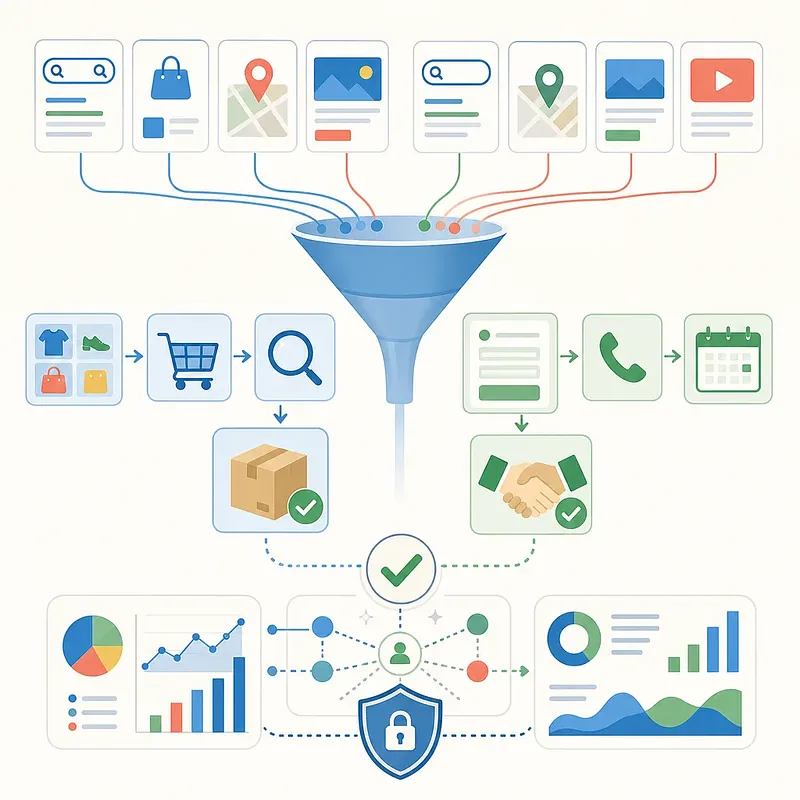
The dashboard visualizes settings and performance metrics for five advertising campaigns.

FAQ

Which campaign should Google Ads beginners start with?

If your business offers products or services that customers search for, a Search campaign makes it easy to understand demand and search terms. For e-commerce, if you have a product feed and accurate purchase values ready, you can also test Performance Max. If you need to generate new demand with visual creative, you can compare Demand Gen.

Do I have to select "Create a campaign without a goal's guidance"?

No, you do not have to select it. This approach makes it easier to review the campaign type and detailed settings yourself, but goal-based campaign creation can also be used if the conversion goals and network settings are accurate. Whichever path you choose, the key is to review the summary screen before publishing.

Why should brand keywords and generic keywords be separated in Search campaigns?

Brand searches often come from users who already know the company, so they may have a higher conversion rate than generic searches. Separating them into different campaigns reduces the risk of brand performance obscuring new-demand performance and allows you to manage budgets, bidding goals, and search terms independently.

Are ads shown for exact match only when the keyword text is exactly the same?

No. Exact match can also include close variants and searches with the same or similar intent. To reduce unnecessary impressions, do not rely solely on match types; review the actual search terms report and manage negative keywords.

Do audience signals in Performance Max restrict targeting?

In general, audience signals are information that the automated system references when it begins learning; they are not hard targeting that limits impressions exclusively to those users. If you want to run ads only to existing customers or cart abandoners, you need to separately check the campaign goal and the requirements of the available customer acquisition and retention features.

If I enter a competitor's URL, can I advertise to visitors to the competitor's site?

Entering a competitor's URL in a custom segment does not directly target only actual visitors to that site. The URL may be used as a signal to find potential customers with relevant interests and purchase intent, so it should not be interpreted as a list of confirmed visitors.

For YouTube conversion ads, should I use a Video campaign or Demand Gen?

If awareness, reach, or video views are the direct goal, a Video campaign may be appropriate. If purchases or leads are the goal, you should compare Demand Gen, which uses YouTube together with other visual placements, with Performance Max, which automates multiple channels. Also check the latest subtypes available in your account.

Should TV and tablet devices be excluded from the outset?

There is no need to exclude them across the board. You can consider excluding them if the target action cannot be completed on those devices or the landing page does not work, but otherwise it is safer to decide after reviewing direct conversions by device and cross-device effects.

If I set an average daily budget, will the same amount be spent every day?

No. Depending on advertising opportunities, spending on a given day may be higher or lower than the average daily budget. The monthly billing limit may vary depending on the period and whether the budget is changed, so you should check the calculation method in the official Google Ads Help documentation.

If performance is poor immediately after publishing an ad, should I change the settings right away?

If you immediately change multiple settings without accounting for conversion delays and automated bidding's learning period, it becomes difficult to identify the cause. Unless there is an urgent issue such as a tracking error or excessive spending, review the data first, then start by changing one major variable among the budget, bidding, targeting, and creative.

Sources

Also available as video and a short read

Videos and a short write-up made from this content. Watch instead of reading, or skim the gist first.

Short version

Loading…

Data formats

This content is available in several machine-friendly formats.

Data-only languages (machine translated, files only)

Indonesian JSON MD Portuguese JSON MD Chinese (Traditional) JSON MD Deutsch JSON MD

Verification

Reviewed by 신익희 · 편집장 · 2026-08-31

Figures in this article were checked against the source material during generation. 2 correction(s) applied. · 2026-08-31

This translation has been cross-checked by AI. · 2026-08-31

Reuse & AI usage

Search indexing and AI citation with attribution are welcome. See the license policy for details.

CC BY · License

Loading…

Loading…

Related content

From Injoys

Request the content you want and take 70% of what it earns

Just leave the subject. We handle production, review, translation and distribution.

See how revenue sharing works

Comments